- Topic
- Technical, AI search
- Reading time
- 8 min
- Written by
- Dima SmetaninCo-founder, SEENMETRIC
- Published
- 21 September 2026
GuidesTechnical
Can AI assistants actually reach your website?
Your website can load perfectly for every customer and still hand an error to the bots that ChatGPT, Claude and Perplexity send to read it. When that happens you are invisible in AI answers for a reason no browser will ever show you.
On this page
You can check your website from your phone right now and it will look perfect. That tells you how the site behaves for a customer. It tells you nothing about how it behaves for the automated readers that ChatGPT, Claude and Perplexity send to fetch your pages, and those readers can be handed a locked door while every human walks straight in.
The short version
- Your site can work for people and fail for AI readers. ChatGPT, Claude and Perplexity send automated readers to fetch your pages, and those readers can be refused while every customer gets in.
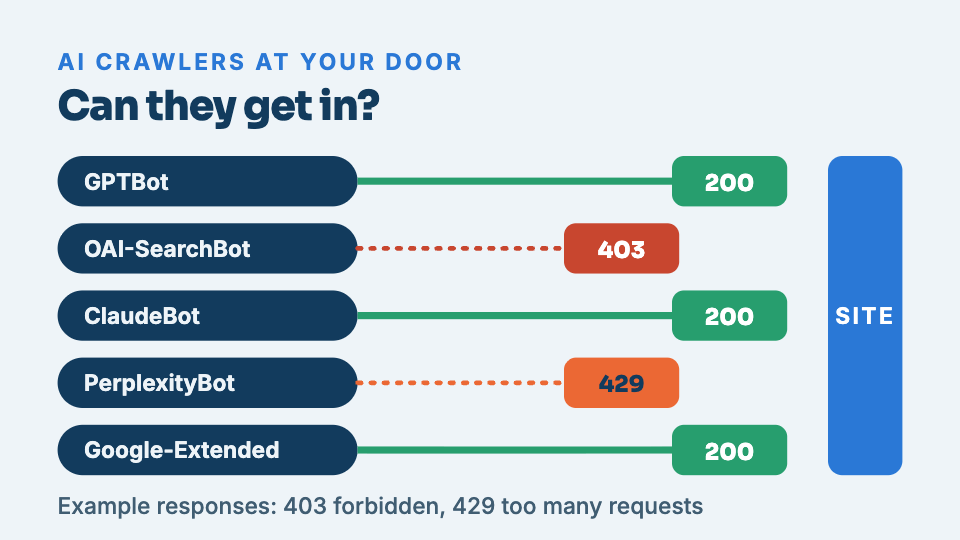
- Each assistant sends its own named reader. GPTBot and OAI-SearchBot for ChatGPT, ClaudeBot for Claude, PerplexityBot for Perplexity, and Google-Extended for Google's AI answers.
- Three ordinary settings cause the blocks. A security wall returns a 403, a traffic limit returns a 429, or an old line in robots.txt tells these readers not to enter.
- Your browser cannot show the problem. Whoever maintains your site can request your homepage as GPTBot and ClaudeBot; any response starting with a 4 means a closed door.
- Fix the security wall first. Then lift the traffic limit for those readers and remove any line in robots.txt that turns them away; customers see no change.
Want to know where your business stands? Our Standard Audit reads up to 40 pages of your site, checks up to 300 Google searches you already show up for, sets you against up to three local competitors, and shows what ChatGPT says when customers ask up to 5 questions. A$149 one-off, delivered in two business days, no access to your site needed.
Get my Standard AuditA site that works for people and fails for machines
When an AI assistant wants to describe or recommend a business, it often sends a small program to read the live page first. That program arrives at the same web address you do, but it announces itself as a bot rather than a browser. A lot of the machinery that protects and speeds up modern websites treats anything announcing itself as a bot with suspicion, and some of it responds by refusing the request outright.
The refusal is invisible to you. Your browser is not a bot, so it is never refused. The page loads, looks healthy, and gives you no reason to suspect that a different visitor is being turned away at the same address a hundred times a day.
Who these readers are, and why to let them in
Each assistant sends its own reader, with its own name. The ones worth knowing are GPTBot and OAI-SearchBot, which belong to ChatGPT, ClaudeBot for Claude, PerplexityBot for Perplexity, and Google-Extended, which governs whether Google may use your pages for its AI answers. When one of these cannot reach you, the assistant behind it has to describe your business from whatever it can find elsewhere, which usually means a directory, a review site, or a competitor.
Three ways you block them without meaning to
Almost nobody blocks these readers on purpose. It happens as a side effect of ordinary settings, and it shows up as one of three responses.
- A security wall says no. The service that shields your site from attacks and spam sees an unfamiliar bot and returns a
403 Forbidden, which means the door is shut. This is the most common cause, and it is often switched on by a plugin or a host with the best of intentions. - A traffic limit trips. A reader that fetches several pages quickly can breach a rate limit meant to stop abuse, and gets a
429 Too Many Requests. The page is fine. The reader is simply told to go away and does. - A line in robots.txt closes it. Sites carry a small file of instructions for bots, and a single line copied from somewhere years ago can tell these readers not to enter. Nobody remembers writing it, and it quietly does its job.
How to check whether it is happening to you
You cannot see this from your browser, because your browser is the one visitor that never gets turned away. The direct way is to fetch your own homepage while pretending to be one of these readers, and see whether the real page comes back or an error does. Whoever built or maintains your site can do this in a couple of minutes: request the page as GPTBot and as ClaudeBot, and read the response code. Anything that starts with a 4 means a closed door.
There is a second, quieter symptom you can look for yourself. If AI assistants describe your business with stale details, a wrong address or an old phone number, while your website has the right ones, that gap is a clue the readers are being kept out and the assistant is leaning on older information from elsewhere.
How to fix each one
The order to work through is cheapest and most likely first. Start with the security wall, because it causes most of these blocks: your host or the service in front of your site can allow the named readers through without weakening anything that matters. Then look at the traffic limit and lift it for those same readers. Last, open the robots.txt file and remove any line that turns them away. None of these changes touches how your site looks or works for customers.
Opening the door does not guarantee an AI assistant will name you. It removes the reason it currently cannot. Everything else in AI visibility assumes the readers can get in, so this is the first thing worth fixing and the one that quietly undoes the rest when it is wrong.
Let us try the door for you
Checking this by hand needs someone comfortable fetching a page as a named bot, which is not most owners. Our Foundation Audit does it for you: it visits your homepage the way these readers do, reports whether each one gets the page or an error, and flags the other things that keep a site out of AI answers. If it comes back clean and assistants still miss you, the problem sits deeper, and our guide on sites that load for people but arrive blank to machines covers the next place to look. To see the whole picture at once, an AI visibility audit ties the access check to what the assistants actually say about you.
Keep reading
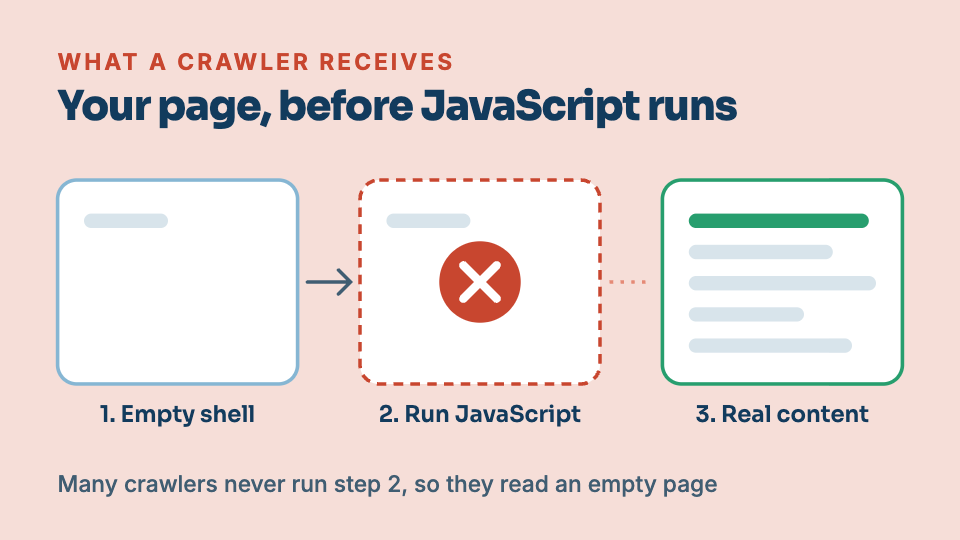
When your website loads for people but not for Google
Your homepage looks perfect when you open it. To Google and to AI assistants, the same page can arrive almost blank. This is one of the most common and most invisible reasons a site never ranks.
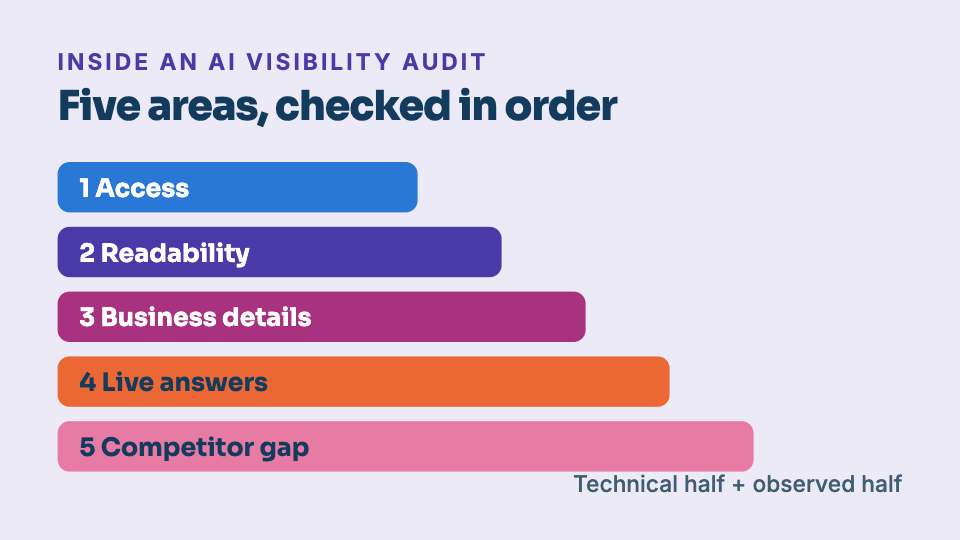
What is an AI visibility audit?
A regular SEO audit asks whether Google can rank you. An AI visibility audit asks a newer question: when a customer asks ChatGPT or Perplexity for a recommendation, are you in the answer? Here is exactly what one checks, and what it can and cannot promise.