- Topic
- Technical
- Reading time
- 9 min
- Written by
- Dima SmetaninCo-founder, SEENMETRIC
- Published
- 7 September 2026
GuidesTechnical
Is your website too slow? Core Web Vitals without the jargon
Google measures how your site feels to a real person on a real phone, and it uses that measurement when it decides who to show. You do not need to be technical to understand what it is grading or why it matters.
On this page
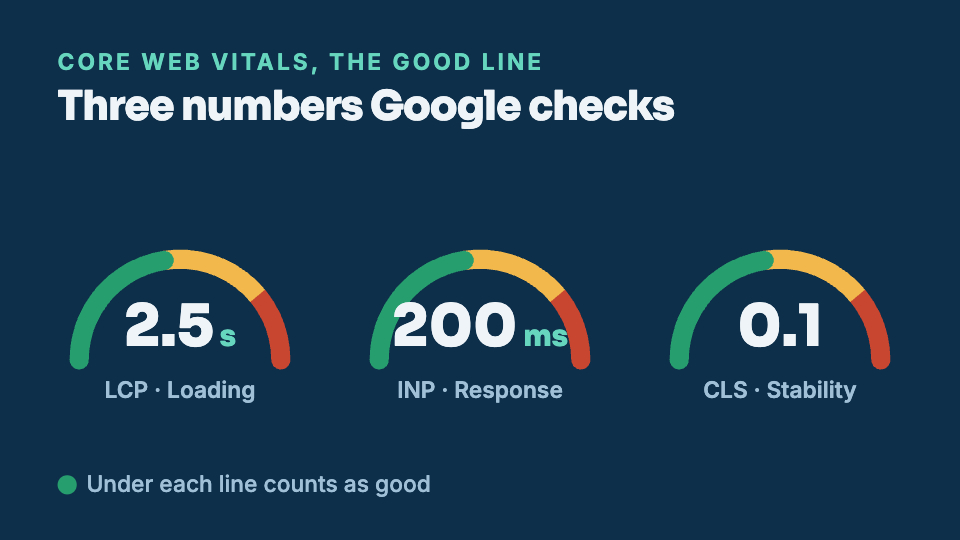
Core Web Vitals sounds like something only a developer should worry about. It is really just three plain questions about how your website feels to a real person holding a real phone. Does the page you wanted show up quickly? Does it react when you tap? Does it stay still while it loads, or does it jump around under your thumb? Google measures those three things, gives your pages a grade, and uses that grade when it decides who to show. Here is what each score means and what you can do or ask for, without any of the jargon.
The short version
- Google grades three things about how your page feels. Loading (good under about 2.5 seconds), response to a tap (under about 200 milliseconds) and stability while it loads (under about 0.1).
- You can check your own scores free in two minutes. Paste your address into PageSpeed Insights and read the real-world data first, because that is what Google uses.
- The causes are ordinary. Huge images, too much script and embeds, chat widgets and adverts, slow hosting, and fonts that hide the text.
- Fix the main image and the hosting first. Those two decide most of the score; the rest is polish.
- Speed is one factor, not a ranking promise. A fast page removes a reason to leave, but it still has to answer the customer's question.
Want to know where your business stands? Our Standard Audit reads up to 40 pages of your site, checks up to 300 Google searches you already show up for, sets you against up to three local competitors, and shows what ChatGPT says when customers ask up to 5 questions. A$149 one-off, delivered in two business days, no access to your site needed.
Get my Standard AuditWhat Google is measuring, and why it bothers
Google's whole business depends on sending people to pages they are glad to land on. A page that takes an age to appear, or that ignores the first tap, or that shoves a button out from under a finger, is a page people back out of. So Google started measuring the experience of a page the way a visitor lives it, on an ordinary phone over an ordinary connection, and it gave that bundle of measurements a name: Core Web Vitals.
The important part is that these are not opinions about your design. They are timings and movements recorded from real visits: how many seconds until the main content shows, how long the page takes to answer a tap, how much things slide about while loading. A slow or jumpy page loses customers before they ever read a word, and Google would rather not send someone to a page they will abandon. That is why speed and stability sit alongside the words on your page as things it pays attention to.
One honest caveat before we go further. Speed helps, but it is one factor among many, and no single score decides where you appear. A fast page with thin content will not outrank a slower page that answers the question far better. Think of Core Web Vitals as clearing a hurdle rather than winning a race: get out of the “poor” band, and you have removed a reason for people and for Google to pass you by.
The three scores explained
There are three vitals, and each has a technical name and an initialism that make them sound harder than they are. Here they are with the jargon set to one side.
- Loading, measured by Largest Contentful Paint (LCP): how quickly the main thing you came for actually shows up. Usually that is the big image or the headline at the top. A good result is under about 2.5 seconds.
- Responsiveness, measured by Interaction to Next Paint (INP): how fast the page reacts when you tap or click something. You press a menu, and the page either answers straight away or sits there thinking. A good result is under about 200 milliseconds, which is roughly the blink of an eye.
- Visual stability, measured by Cumulative Layout Shift (CLS): whether things stay put while the page loads, or jump around as images and adverts drop in. A good result is under about 0.1, where lower means steadier.
Google sorts each of these into three bands: good, needs work, and poor. You do not have to memorise the numbers. The bands are what matter, and the goal is simply to get each vital into the good band, or at least out of poor.
A closer look at visual stability
Loading and responsiveness are easy to picture. Visual stability is the one people rarely have a name for, even though it annoys them every day. It is the page that jumps. You go to tap a link, and in the split second before your finger lands, an image or an advert finishes loading higher up and pushes everything down. Your tap lands on the wrong thing. Now you are on a page you did not want, or worse, you have tapped a button you never meant to.
This usually happens for a boring reason. The browser did not know how tall the image or advert would be, so it left no room for it, then had to make room once it arrived. The fix is boring too: tell the browser the size of those spaces in advance so it can hold the gap open. You do not need to do that yourself, but it is exactly the kind of thing worth asking whoever looks after your site to check.
How to check your own site in two minutes, free
You can see your own scores without installing anything. Google runs a free tool called PageSpeed Insights. You paste your web address in, wait a few seconds, and it grades the page against all three vitals and marks each one good, needs work, or poor.
One thing on that page is worth understanding, because it confuses almost everyone. The results come in two flavours. There is real-world data, sometimes labelled field data, which is gathered from actual Chrome visitors to your site over recent weeks. And there is lab data, which is a single test run on a simulated phone right then. If your page has enough real visitors, read the real-world data first, because that is what Google actually uses. The lab test is useful for spotting what to fix, but it is one run in a controlled setting, not a verdict.
If you have Google Search Console set up for your site, it has a Core Web Vitals report of its own that groups your pages into good, needs work, and poor, across your whole site rather than one page at a time. It is the easiest way to see whether a problem is on one page or everywhere. For a plainer summary that also looks at whether machines can read your pages at all, the Foundation Audit on seenmetric.com.au measures your real page speed along the way and emails you the issues worth fixing first.
The usual culprits
When a page is slow or jumpy, the cause is nearly always one of a short list of ordinary things. None of them are mysterious, and most are fixable without rebuilding anything.
- Huge, uncompressed images. A photo saved straight off a camera can be several megabytes. On a phone that is the difference between a page that appears at once and one that fills in slowly from the top. The same picture, saved at web size, often looks identical and loads in a fraction of the time.
- Too much script and too many third-party embeds. Every extra piece of code the browser has to fetch and run holds up the page. A map, a booking widget, a social feed, an analytics tag: each one is small on its own, and together they add up. Heavy reliance on JavaScript slows the page and, as we cover in why a site can load for people but not for Google, can also stop machines reading your content at all. It hurts both speed and readability.
- Chat widgets and adverts. The little chat bubble in the corner and any advertising slots are common causes of both slowness and the jumping we saw above, because they load late and shove the rest of the page around.
- Slow hosting. If the computer your website lives on is cheap or overloaded, every page starts slow no matter how tidy it is. This is the foundation, and no amount of tuning on top fixes a slow foundation.
- Fonts that block the text. Some sites hide their words until a custom font finishes downloading. The visitor stares at a blank space that could have shown readable text straight away. A small setting lets the text appear first and swap to the nice font when it arrives.
What is worth fixing first
You do not have to chase a perfect score, and you should not try to. Chasing the last few points on every metric is where people burn hours for little gain. The wins that move the needle are usually the big, obvious ones, and they come in a sensible order.
- Sort the main image. The biggest single thing on most pages is the hero image at the top, and it is often the biggest file too. Getting that one image down to a sensible size, and telling the browser how much room to hold for it, tends to help both loading and stability in one go.
- Get the hosting right. If your whole site is slow to begin with, fix that before anything else. A faster, less crowded host lifts every page at once, and it is pointless to micro-tune a page that starts slow.
- Trim what you do not use. Old tracking tags, a widget you added once and forgot, a second chat tool: remove the ones you no longer need. Every one you drop is weight the browser no longer carries.
- Then, and only then, the fine tuning. Font settings, small scripts, the last stubborn shift. These matter, but they are the polish, not the foundation, and they belong after the heavy items are handled.
Get the main image and the hosting right before you touch anything small. Those two decide most of the score, and everything else is refinement.
None of this promises a place at the top of Google. Speed is one ingredient, and a fast page still needs to answer the question a customer came with. What a fast, steady page does is remove a reason to leave, for the visitor and for Google alike. It is also the plainest foundation for being found by AI assistants, which lean on the same readable, quick-loading pages that people do, as we explain in how Australian businesses get found in AI search. Fix the big, easy things first, and the rest can wait until you want it.
Keep reading
When your website loads for people but not for Google
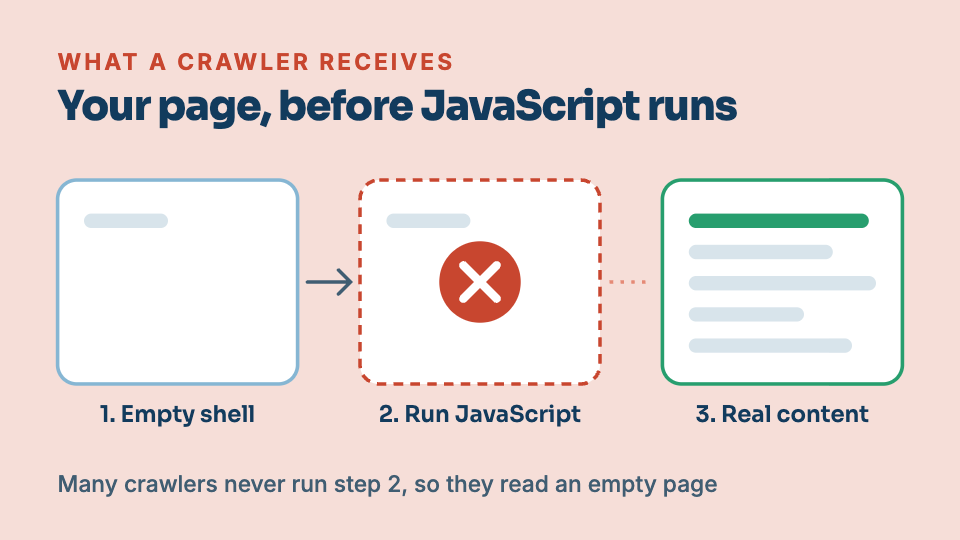
Your homepage looks perfect when you open it. To Google and to AI assistants, the same page can arrive almost blank. This is one of the most common and most invisible reasons a site never ranks.
How Australian businesses get found in AI search
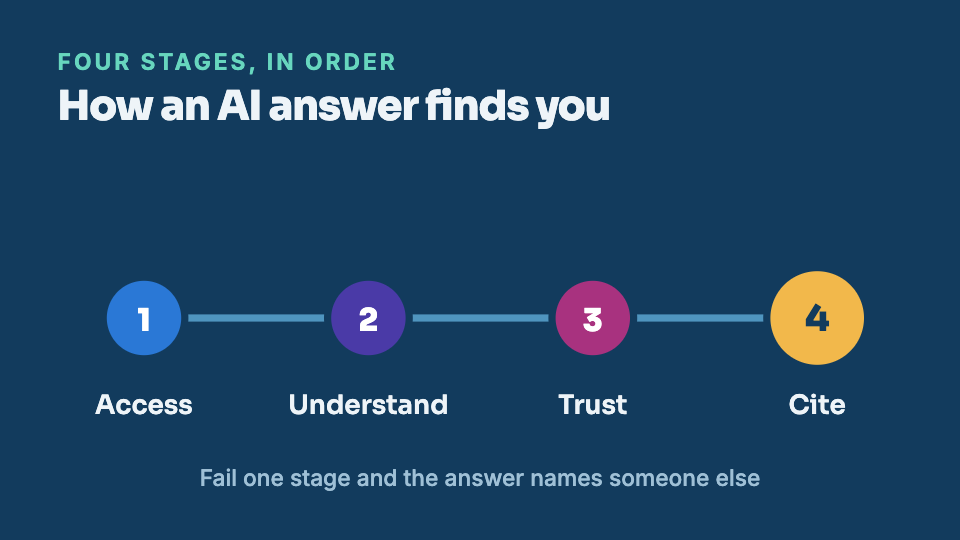
Search is splitting in two. Google still lists links, and a growing share of customers now get a single spoken answer from ChatGPT, Gemini or Perplexity instead. Here is what decides whether that answer names you.